

Latest Version
Version
8.1\"},{\"releaseDate\":\"2022-12-05
8.1\"},{\"releaseDate\":\"2022-12-05
Update
October 31, 2025
October 31, 2025
Developer
Cast photo, video, music to TV
Cast photo, video, music to TV
Categories
Media
Media
Platforms
iOS
iOS
File Size
43.4 MB
43.4 MB
Downloads
0
0
License
Free
Free
Report
Report a Problem
Report a Problem
More About TV Assist
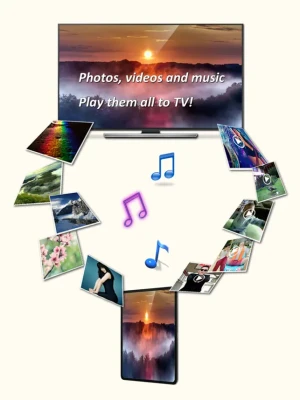
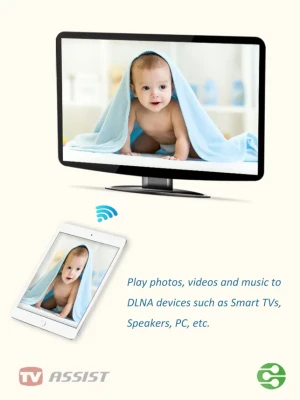
Play photos, videos, and music from your iPhone/iPad to DLNA-compatible devices such as smart TVs, AV systems, speakers, PCs, and other mobile devices.
Easy to use - Just pick your media and tap to play, only one single step to play it on your TV!
Anytime, anywhere, across devices - Enjoy sharing photos, videos, and music with friends and family. Stream content to a nearby TV or other devices for everyone to view or listen together.
TV Assist also lets you browse media on other DLNA devices and play them directly on your iPhone/iPad or another compatible device.
Getting photos, videos and music from friends is easy - Use TV Assist as a media receiver (renderer) to accept media streamed from other DLNA devices (e.g., another iPhone/iPad running TV Assist).
Key Features:
- Display photos on other devices in multiple sizes for the best viewing experience;
- Play videos on other devices in all supported qualities;
- Play music on other devices with metadata;
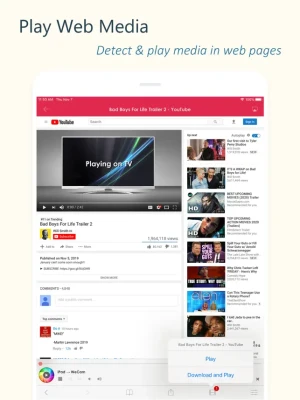
- Detect and play media content from web pages;
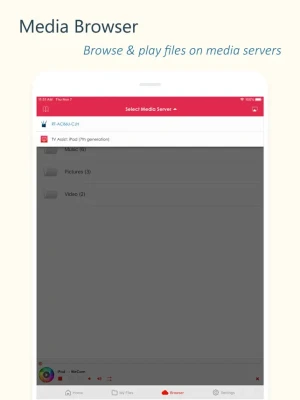
- Access and play media files stored on other DLNA devices;
- Upload files to your iPhone/iPad and play them;
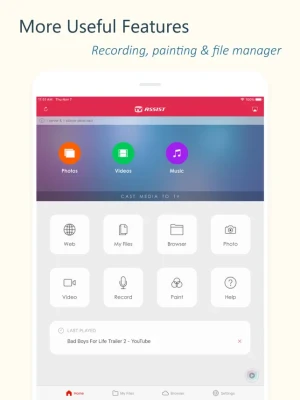
- Draw on your TV screen interactively;
- Record videos or audio and stream them directly to TV;
- Work as a renderer: Receive media from other DLNA devices;
- Work as a server: Share your device's media with other DLNA devices.
Supported Devices:
- TVs from Samsung, LG, Sony, Panasonic, Sharp, Philips, Thomson and many others;
- AV systems from DENON, Onkyo, Marantz, Bose, Pioneer and many others;
- Game consoles such as Xbox 360, PlayStation 3;
- Media Players: Apple TV, Sony Blu-ray players, TV boxes and others;
- PCs/Mac: Twonky, Windows Media Player, Plex, and others;
- All DLNA/UPnP-certified devices.
Important Notes:
- TV Assist relies on DLNA technology and requires a WiFi connection;
- Ensure your TV/device is DLNA-compatible and connected to the same local network;
- Some iPhone/iPad media formats may not be supported by your TV/device;
- TV Assist cannot access media from other iOS apps (e.g., the native Videos app). Upload files to TV Assist for playback.
Anytime, anywhere, across devices - Enjoy sharing photos, videos, and music with friends and family. Stream content to a nearby TV or other devices for everyone to view or listen together.
TV Assist also lets you browse media on other DLNA devices and play them directly on your iPhone/iPad or another compatible device.
Getting photos, videos and music from friends is easy - Use TV Assist as a media receiver (renderer) to accept media streamed from other DLNA devices (e.g., another iPhone/iPad running TV Assist).
Key Features:
- Display photos on other devices in multiple sizes for the best viewing experience;
- Play videos on other devices in all supported qualities;
- Play music on other devices with metadata;
- Detect and play media content from web pages;
- Access and play media files stored on other DLNA devices;
- Upload files to your iPhone/iPad and play them;
- Draw on your TV screen interactively;
- Record videos or audio and stream them directly to TV;
- Work as a renderer: Receive media from other DLNA devices;
- Work as a server: Share your device's media with other DLNA devices.
Supported Devices:
- TVs from Samsung, LG, Sony, Panasonic, Sharp, Philips, Thomson and many others;
- AV systems from DENON, Onkyo, Marantz, Bose, Pioneer and many others;
- Game consoles such as Xbox 360, PlayStation 3;
- Media Players: Apple TV, Sony Blu-ray players, TV boxes and others;
- PCs/Mac: Twonky, Windows Media Player, Plex, and others;
- All DLNA/UPnP-certified devices.
Important Notes:
- TV Assist relies on DLNA technology and requires a WiFi connection;
- Ensure your TV/device is DLNA-compatible and connected to the same local network;
- Some iPhone/iPad media formats may not be supported by your TV/device;
- TV Assist cannot access media from other iOS apps (e.g., the native Videos app). Upload files to TV Assist for playback.
Rate the App
Add Comment & Review
User Reviews
Based on 0 reviews
No reviews added yet.
Comments will not be approved to be posted if they are SPAM, abusive, off-topic, use profanity, contain a personal attack, or promote hate of any kind.














More »

Popular Apps

Metal Slug: AwakeningHaoPlay Limited

Solo Leveling:AriseNetmarble

Story Maker & Layout TemplatesEdit Text, Add Layers & Fonts

Paga - Send, Pay, and BankMoney Transfer App

World War Heroes — WW2 PvP FPSAzur Interactive Games Limited

Aimtoget WalletAirtime to cash, data & bills

Photo Dance:AI Video GeneratorAI photo dance&Viggle AI dance

Reelsy Reel Maker IG TemplatesInsta Reels Trend Story Editor

Road to Valor: World War IIDreamotion Inc.

Day R Survival: Last SurvivorRmind Games
More »
Editor's Choice

Grim Soul: Dark Survival RPGBrickworks Games Ltd

Craft of Survival - Gladiators101XP LIMITED

Last Shelter: SurvivalLong Tech Network Limited

Dawn of Zombies: Survival GameRoyal Ark

Merge Survival : WastelandStickyHands Inc.

AoD Vikings: Valhalla GameRoboBot Studio

Viking Clan: RagnarokKano Games

Vikings: War of ClansPlarium LLC

Asphalt 9: LegendsGameloft SE

Modern Tanks: War Tank GamesXDEVS LTD