
Latest Version
Version
5.0\"},{\"releaseDate\":\"2025-08-29
5.0\"},{\"releaseDate\":\"2025-08-29
Update
October 26, 2025
October 26, 2025
Developer
Background eraser photo editor
Background eraser photo editor
Categories
Media
Media
Platforms
iOS
iOS
File Size
219.1 MB
219.1 MB
Downloads
0
0
License
Free
Free
Report
Report a Problem
Report a Problem
More About Retouch : AI Object Remover
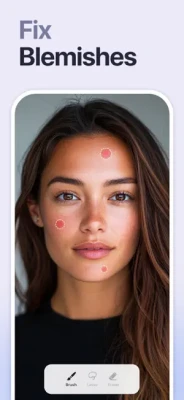
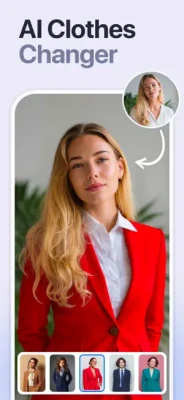
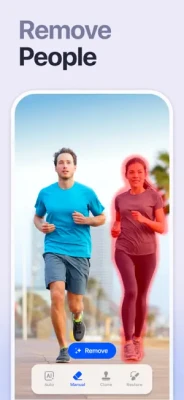
Remove objects, people or text from photos easily with this ai retouch app. Erase backgrounds of a photo and save as transparent with just one tap. Fix your blemishes also with advanced one-tap-retouch feature. Change your outfit with our advanced ai clothes changer feature instantly.
Features
Remove Object: Tap or brush away tourists, wires, or stains. Quick Mode erases with AI; Brush & Lasso gives pixel-perfect control.
AI Outfit Changer: Try-on new dresses with our outfit generator.
Clone Stamp: Sample any clean patch and paint over distractions. Edge-aware blending matches texture, light, and perspective.
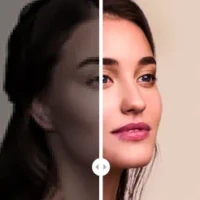
AI Retouch: One swipe zaps blemishes, smooths skin, sharpens eyes, adds a natural glow, and whitens teeth while preserving pores.
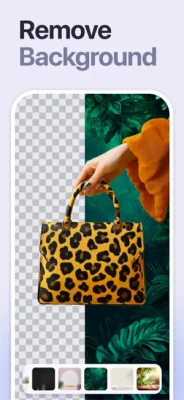
Replace Background: Auto-cut subjects and drop them onto built-in scenes, your own images, or transparent PNGs for pro-grade product shots.
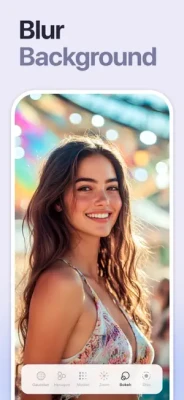
Background Blur: Pop subjects with DSLR-style depth—Gaussian, Motion, Bokeh, Hexagon, Disc, and more—and adjust focus and strength in real time.
Photo Overlay & Double Exposure: Layer textures, designer frames, or a second image, then fine-tune opacity and blend modes for instant magazine vibes.
Stylish Portrait: Soft-focus backgrounds, polish facial details, and apply studio color toning for a cover-ready finish.
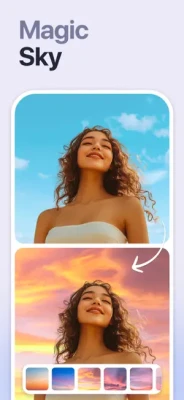
Sky Changer: Auto-detect the horizon and swap gray skies for golden sunsets, auroras, or storm clouds with perfect color matching and crisp edges.
Photo Blending: AI isolates your subject and fuses it with artistic overlays; refine with manual brush and eraser for cinematic double exposures.
Dripping Portrait: Melt edges into flowing paint drips; pick preset shapes or draw your own, then adjust length, direction, and gradients.
Spiral Effects: Wrap subjects in neon coils, glitter ribbons, or dotted trails. Tweak thickness, color, and rotation for instant 3-D pop.
Unlimited undo/redo, high-resolution exports, and before/after previews keep every experiment safe and speedy—so you can perfect anything from quick selfies to polished product shots without ever losing a pixel of quality.
This app includes advertisement. To enjoy ad free experience and using all premium contents, we are offering a Premium subscription package.
Retouch Premium Subscription information
• Subscription Length: Weekly, Monthly.
• Your payment will be charged to your iTunes Account as soon as you confirm your purchase.
• You can manage your subscriptions and turn off auto-renewal from your Account Settings after the purchase.
• Your subscription will renew automatically unless you turn off auto-renew at least 24 hours before the end of the current period.
• The cost of renewal will be charged to your account 24 hours before the end of the current period.
• When canceling a subscription, your subscription will stay active until the end of the period. Auto-renewal will be disabled, but the current subscription will not be refunded.
• Any unused portion of a free trial period, if offered, will be forfeited when purchasing a subscription.
Privacy policy: https://sites.google.com/view/anthonydurbins/privacy
Terms of service: https://sites.google.com/view/anthonydurbins/terms
Contact for support, reporting bug or improvement suggestions
email: app.care.anthony@gmail.com
You may also contact our support team through the app’s settings screen.
Remove Object: Tap or brush away tourists, wires, or stains. Quick Mode erases with AI; Brush & Lasso gives pixel-perfect control.
AI Outfit Changer: Try-on new dresses with our outfit generator.
Clone Stamp: Sample any clean patch and paint over distractions. Edge-aware blending matches texture, light, and perspective.
AI Retouch: One swipe zaps blemishes, smooths skin, sharpens eyes, adds a natural glow, and whitens teeth while preserving pores.
Replace Background: Auto-cut subjects and drop them onto built-in scenes, your own images, or transparent PNGs for pro-grade product shots.
Background Blur: Pop subjects with DSLR-style depth—Gaussian, Motion, Bokeh, Hexagon, Disc, and more—and adjust focus and strength in real time.
Photo Overlay & Double Exposure: Layer textures, designer frames, or a second image, then fine-tune opacity and blend modes for instant magazine vibes.
Stylish Portrait: Soft-focus backgrounds, polish facial details, and apply studio color toning for a cover-ready finish.
Sky Changer: Auto-detect the horizon and swap gray skies for golden sunsets, auroras, or storm clouds with perfect color matching and crisp edges.
Photo Blending: AI isolates your subject and fuses it with artistic overlays; refine with manual brush and eraser for cinematic double exposures.
Dripping Portrait: Melt edges into flowing paint drips; pick preset shapes or draw your own, then adjust length, direction, and gradients.
Spiral Effects: Wrap subjects in neon coils, glitter ribbons, or dotted trails. Tweak thickness, color, and rotation for instant 3-D pop.
Unlimited undo/redo, high-resolution exports, and before/after previews keep every experiment safe and speedy—so you can perfect anything from quick selfies to polished product shots without ever losing a pixel of quality.
This app includes advertisement. To enjoy ad free experience and using all premium contents, we are offering a Premium subscription package.
Retouch Premium Subscription information
• Subscription Length: Weekly, Monthly.
• Your payment will be charged to your iTunes Account as soon as you confirm your purchase.
• You can manage your subscriptions and turn off auto-renewal from your Account Settings after the purchase.
• Your subscription will renew automatically unless you turn off auto-renew at least 24 hours before the end of the current period.
• The cost of renewal will be charged to your account 24 hours before the end of the current period.
• When canceling a subscription, your subscription will stay active until the end of the period. Auto-renewal will be disabled, but the current subscription will not be refunded.
• Any unused portion of a free trial period, if offered, will be forfeited when purchasing a subscription.
Privacy policy: https://sites.google.com/view/anthonydurbins/privacy
Terms of service: https://sites.google.com/view/anthonydurbins/terms
Contact for support, reporting bug or improvement suggestions
email: app.care.anthony@gmail.com
You may also contact our support team through the app’s settings screen.
Rate the App
Add Comment & Review
User Reviews
Based on 0 reviews
No reviews added yet.
Comments will not be approved to be posted if they are SPAM, abusive, off-topic, use profanity, contain a personal attack, or promote hate of any kind.










More »

Popular Apps

Metal Slug: AwakeningHaoPlay Limited
Solo Leveling:AriseNetmarble

Story Maker & Layout TemplatesEdit Text, Add Layers & Fonts

Paga - Send, Pay, and BankMoney Transfer App

World War Heroes — WW2 PvP FPSAzur Interactive Games Limited

Aimtoget WalletAirtime to cash, data & bills
Photo Dance:AI Video GeneratorAI photo dance&Viggle AI dance

Reelsy Reel Maker IG TemplatesInsta Reels Trend Story Editor

Road to Valor: World War IIDreamotion Inc.
Day R Survival: Last SurvivorRmind Games
More »
Editor's Choice
Grim Soul: Dark Survival RPGBrickworks Games Ltd
Craft of Survival - Gladiators101XP LIMITED

Last Shelter: SurvivalLong Tech Network Limited
Dawn of Zombies: Survival GameRoyal Ark
Merge Survival : WastelandStickyHands Inc.

AoD Vikings: Valhalla GameRoboBot Studio
Viking Clan: RagnarokKano Games
Vikings: War of ClansPlarium LLC

Asphalt 9: LegendsGameloft SE

Modern Tanks: War Tank GamesXDEVS LTD